AppShot Open AppShot
●Offline · No account · Free

The App Store toolkit that runs in your browser.

Design the screenshots, write the ASO copy and prep the App Store Connect submission, with no account and nothing sent anywhere. Open it, and it works offline.

Free in the browser. Autosaves here, exports a .appshot.json you own. The Mac app will add simulator capture and elements from your own app.
Stage
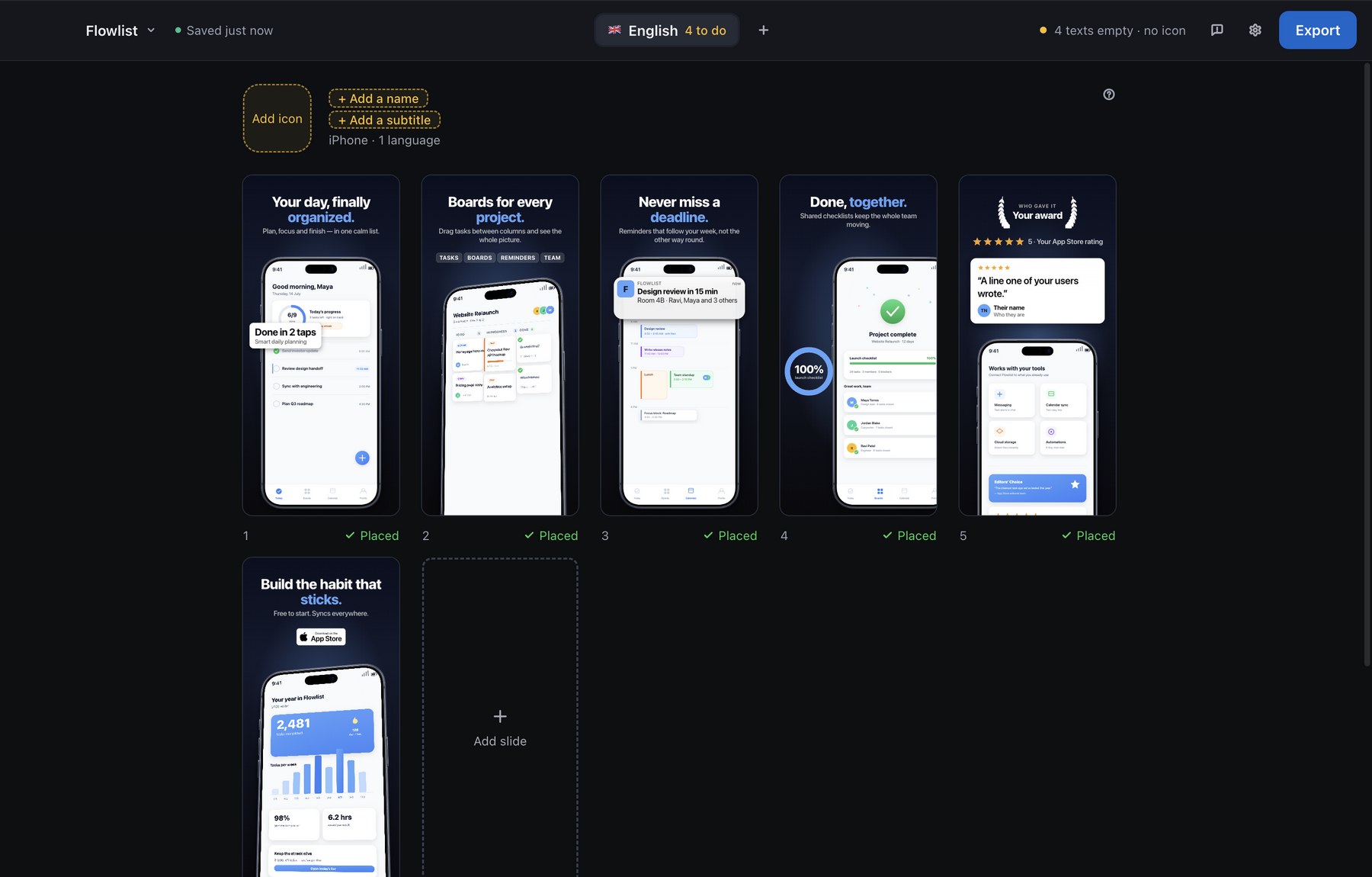
AppShot's Stage: six slides of an example deck in a grid
Design
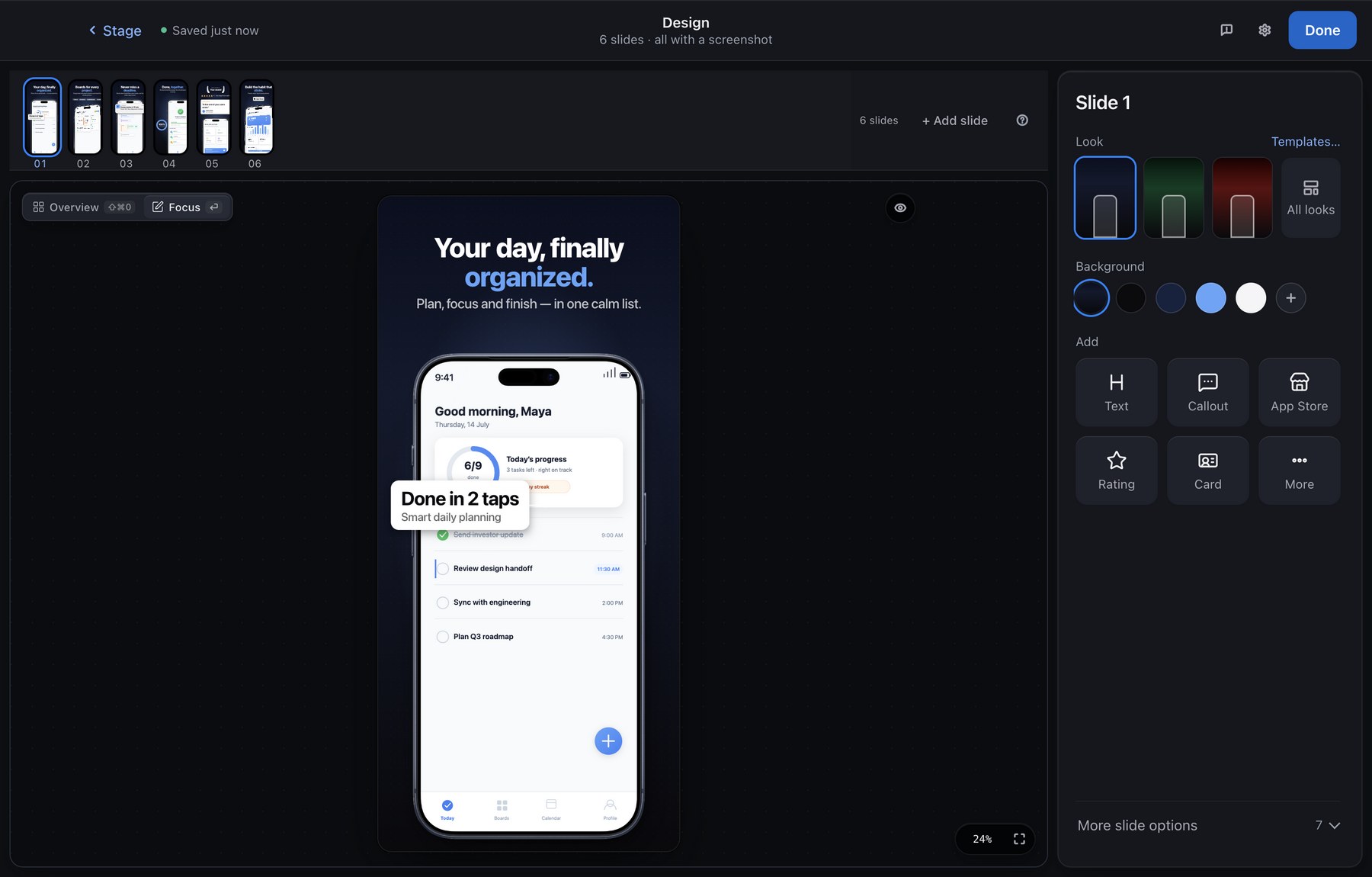
AppShot's Design editor: the slide on the canvas, the filmstrip above, the slide panel on the right
01The flow

Four steps, one project.

Each step is a page of the app itself. Screenshots, listing text and submission prep share one project and one undo history.

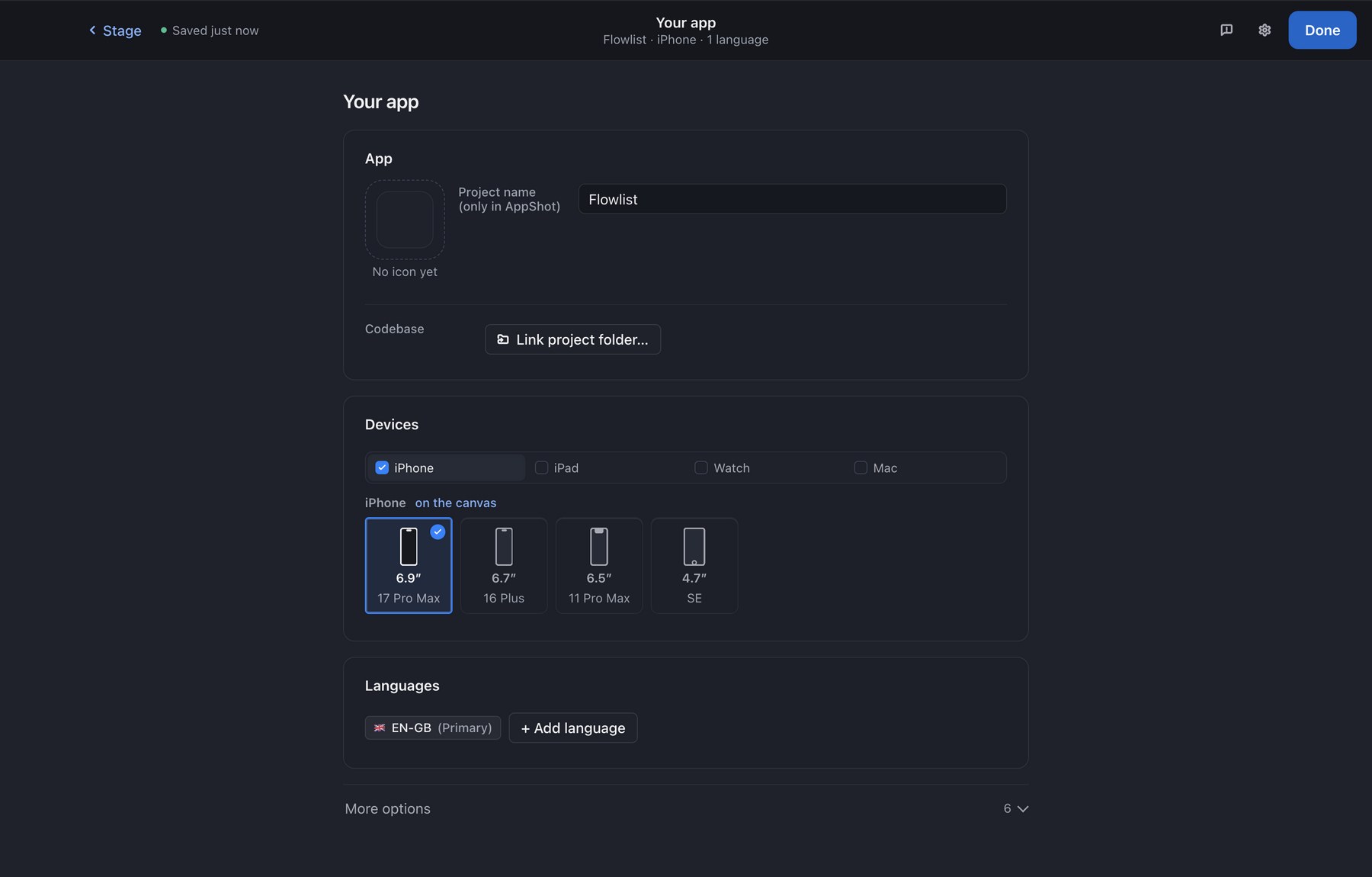
The Your app step: icon, name, devices and languages
01

Your app

Name, icon, the devices you ship on and your languages. Start from your own screenshots, an example deck or a blank project.

Mac app: link your Xcode folder
The Screenshots step: a grid of slides
02

Screenshots

One tile per slide and language. Drop the screenshots you have; the Mac app captures them from the simulator for you.

The Design step: the canvas editor
03

Design

A canvas editor built for the App Store: bezels, headlines, callouts, highlights that magnify one detail, and a look you can change for every slide at once.
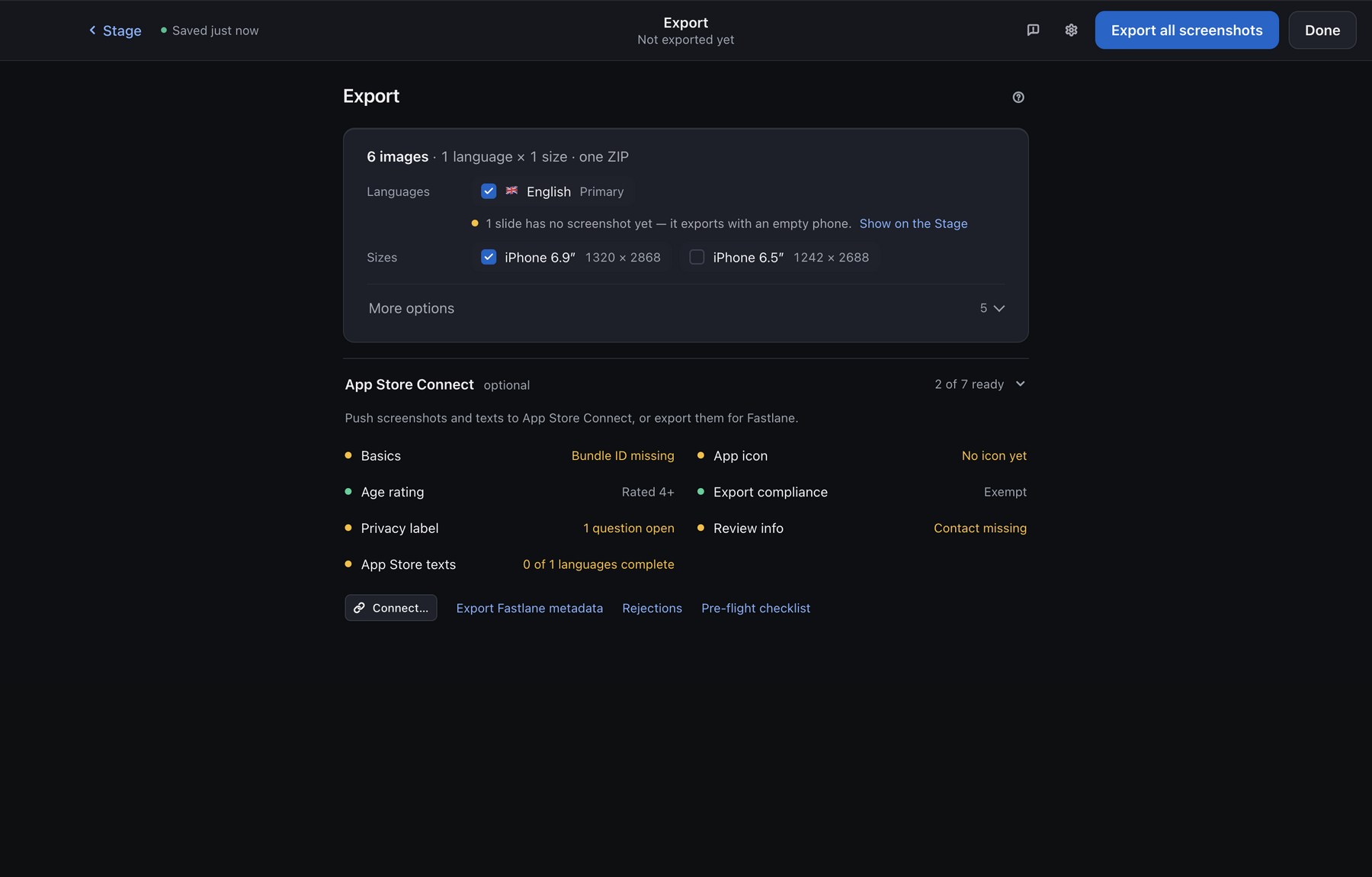
The Export step: images, App Store page and App Store Connect
04

Export

The App Store set as one ZIP, your listing text with live limits and lints, and an App Store Connect checklist before you open the portal.

02Calibration

The iPhone sizes App Store Connect takes, drawn to scale.

Four iPhone sizes today, each exported at its exact pixel size, with frames from the display metrics Apple documents, per model. Coming soon: iPad, Apple Watch and the new iPhone Duo; more iPhone models follow as Apple releases them.

13201290124275013″11″46mm49mm45mm44mmiPhone · width in pxiPad · coming soonApple Watch · coming sooniPhone · width in px132012901242750iPad · coming soon13″11″Apple Watch · coming soon46mm49mm45mm44mm
4

iPhone screenshot sizes, from 1320 to 750 px wide, each exported at its exact pixel size.

15

drawn iPhone frame models, from the home button to the Dynamic Island, each with its own bezel and corner radius.

13

example decks of six slides each, redrawn for whichever slot you pick.

03Simulator capture · Mac app

9:41, full bars, 100%. Captured, not retouched.

The Mac app drives the iOS Simulator for you. Every slide gets a native screenshot at exactly the slot's size, straight into its frame.

  1. Pick the simulatorPre-selected to match your canvas device, and booted for you if it isn't.
  2. Set the status bar onceTime, network, bars and battery, saved with the project so every slide matches.
  3. Give each slide its stateLaunch arguments per slide, so slide three shows day seven.
  4. Highlight what is really thereEvery capture also reads the app's own elements, so a highlight snaps to the real button.
# what the Mac app runs for you, per slide
xcrun simctl status_bar <sim> override --time 9:41 \
  --cellularBars 4 --wifiBars 3 --batteryLevel 100
xcrun simctl launch <sim> com.you.app -Screen home
xcrun simctl io <sim> screenshot slide-01.png  # 1320 × 2868

# no Terminal, no Node, nothing to install:
# it all ships inside the app, which will be
# signed and notarized
04Where your data is

On your Mac. That's the whole answer.

  • There is no server, so nothing to sign up for, nothing to sync, nothing to leak and nothing that stops working when a startup pivots.
  • The app is a folder of plain files: nothing to install. Open it from disk or serve it from any folder.
  • Your project autosaves in the browser and exports as .appshot.json. Screenshots you drop in are stored in that file and never leave it.
  • No analytics, no cookies, no calls home.
05Pricing

Free now. One payment later. Never a subscription.

A tool with no server has nothing recurring to charge you for.

Free
€0
  • The whole screenshot editor, every frame, every slot
  • ASO copy editor with lints, per language
  • App Store Connect checklist and pre-flight
  • Export the App Store set as one ZIP
Open AppShot
Not for sale yetMac app
One-timeprice to be set
  • Live capture from the iOS Simulator
  • Link your Xcode, Flutter or React Native project
  • Highlights that snap to your app's real elements
  • Every Apple product bezel, one click away
  • Export every slide at every size and every language
  • Everything in Free, forever, no renewal
A single purchase and a direct download; the app will be signed and notarized before it ships.
06Questions

Questions, answered.

Does it really work offline?
Yes. The first load fetches the page and its scripts; after that everything runs in the browser.
Which browsers?
Chrome, Edge and Safari on macOS. The editor is mouse-and-keyboard first.
What do I need for simulator capture?
The Mac app and Xcode. The app talks to the simulator itself, with nothing to install. The free web version takes screenshots you already have.
What is it, technically?
A folder of plain HTML, CSS and JavaScript, with two vendored libraries for PNG and ZIP export. No build step, no framework, no package manager.

Your next screenshots, in the browser you already have open.

Open AppShot